Accounting
Accounts package integrations


Accounts package integrations
Sync
Initial setup mirrors your accounts' package settings with Autowork Go's invoicing function. Ensures invoices created in Autowork Go can be pushed into your accounts package without any fuss.
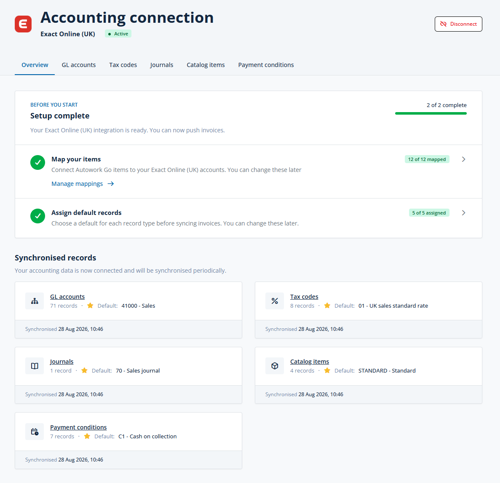
Only one-time setup
Connect Autowork Go's line item templates to your products and services within your accounts package. Ensures that VAT/sales tax is correct across both systems making reconciliation and tax reporting accurate and hassle-free.
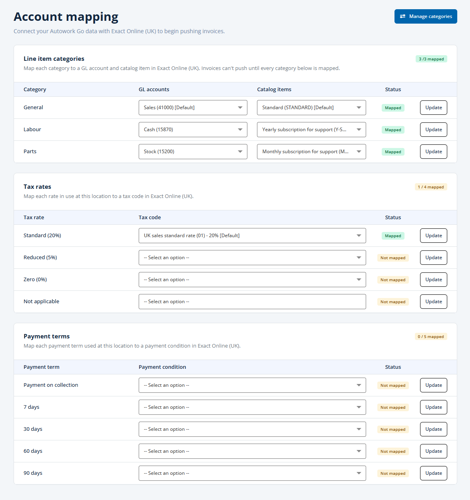
Link
Autowork Go synchronises your contacts/customers ensuring that invoices and quotes are attached to the right records. Manage your customer details in Autowork Go knowing that your accounts package data will be updated behind the scenes.
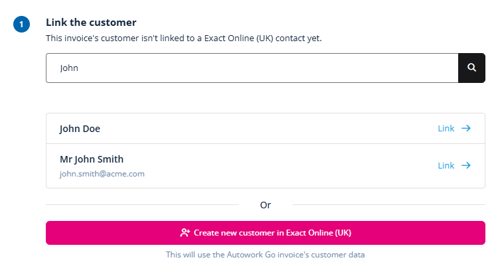
Transfer
Let Autowork Go take the stress out of managing invoices in two places. All invoices are pushed to your accounts package making bank reconciliation child's play.
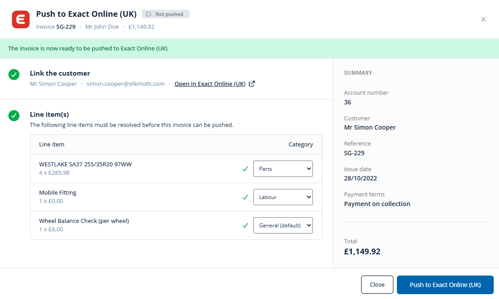
Connected
You can sync your account software settings, link line item information, link customer accounts and push invoices into your chosen accounting software. Autowork Go is compatible with the following accounting softwares.

Updating an invoice in Autowork Go will send the changes to the accounting software to update the already pushed invoice.
Cancelling an invoice will remove it in the accounting software.
Credit notes.